Stripe affiliate tracking: the Black Friday coupon that costs your partner $108 a customer
A 30% coupon, a refund in month two and a mid-cycle upgrade, worked out in dollars from Dub's and Stripe's docs. Plus the gaps the docs leave open, and a test to run before Nov 27.
Set your Black Friday coupon to forever and every partner who sends you a customer that weekend earns less on that customer for the life of the commission. On a $100-a-month plan, with a 30% coupon and a 30% recurring commission, that's $108 per customer out of the partner's pocket over the 12-month commission. Nothing is broken. The commission is smaller every month because the invoice is.
Stripe affiliate tracking is full of side effects like that, partly because Stripe doesn't track affiliates at all. It records customers, invoices and refunds, and a tool like Dub, or your own webhook code, turns those records into commissions. So whatever changes the cash on an invoice changes what your partner earns, and coupons, refunds and mid-cycle upgrades all do. The partner and customers below are made up. The rules come from Dub's and Stripe's docs, and where Dub's docs go quiet, I say so.
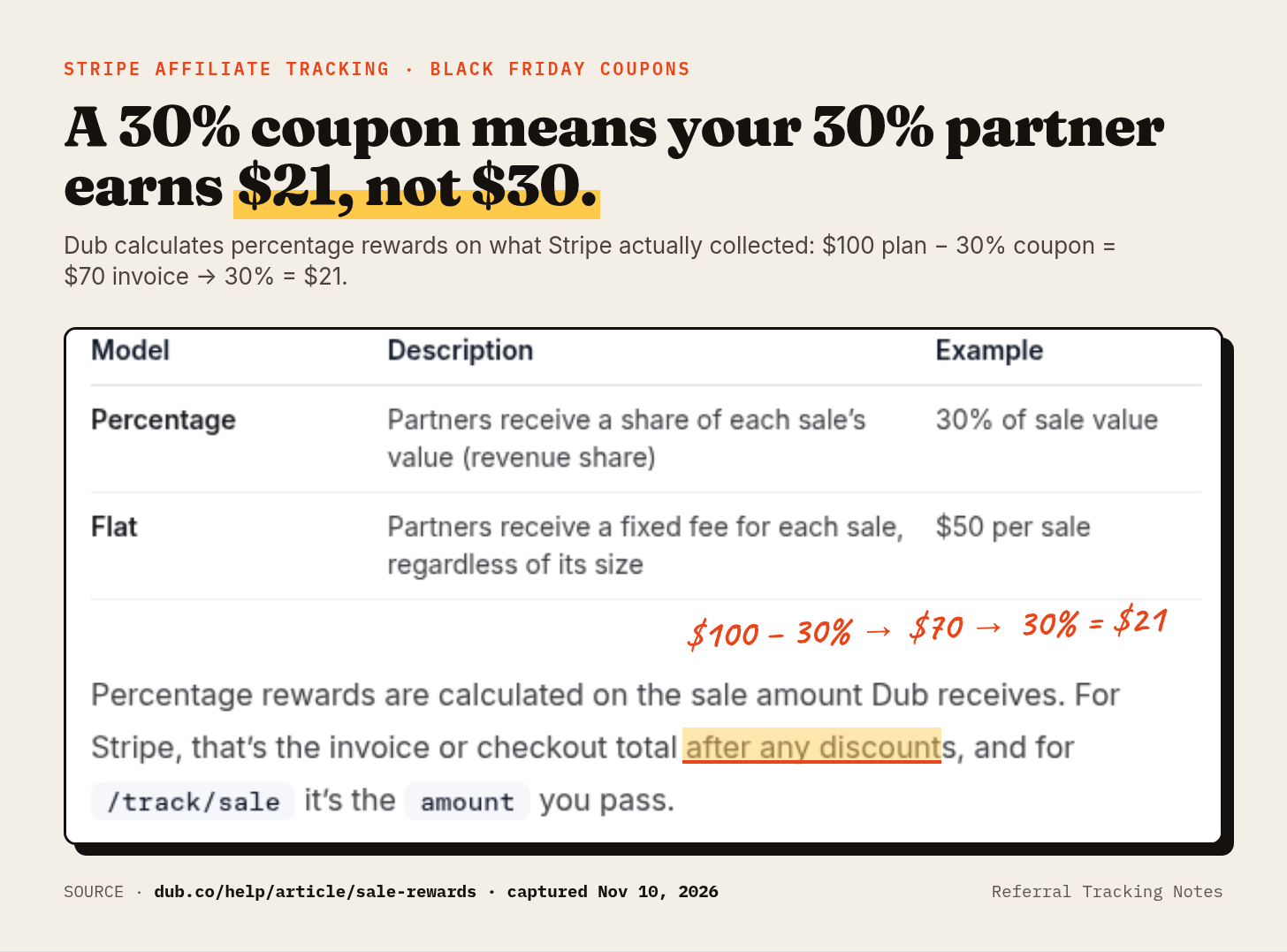
The rule underneath all of it: the commission follows the cash the customer paid and kept. Dub calculates percentage rewards on "the invoice or checkout total after any discounts" (Dub help: sale rewards), with tax removed, and "Commissions that are already paid cannot be refunded" (Dub docs: tracking refunds).
The setup
- The plan is $100 a month on Stripe Billing.
- The partner reward is 30% recurring for 12 months. Dub's reward builder takes exactly that, and "30% recurring for 12 months" is the example in its own help article (sale rewards).
- The payout holding period is 30 days, Dub's default. You can set anything from 0 to 90 (Dub help: partner payouts).
- Priya clicks Leo's partner link and subscribes on Black Friday, Nov 27, 2026, with a 30%-off coupon set to
once, Stripe's default.
This assumes Dub's Stripe integration, which needs Dub's Business plan or higher (Dub docs: Stripe integration; dub.co/pricing). Every paid Stripe payment or invoice becomes a sale event, and each sale event creates a commission (sale rewards).
How Stripe affiliate tracking treats a Black Friday coupon
Priya's first invoice is $100 minus 30%, so $70. Leo gets 30% of $70, which is $21, not $30. Good. Paying commission on a sticker price nobody paid is how a launch-week promo starts losing money.
The coupon's duration sets the next 11 months
Stripe coupons last once, repeating for a set number of months, or forever. The default is once, which "applies only to the first invoice" (Stripe docs: coupons and promotion codes). Since the commission follows each discounted invoice, the duration you pick for your Black Friday code is also a decision about your partners' pay. Leo's total over Priya's first 12 invoices:
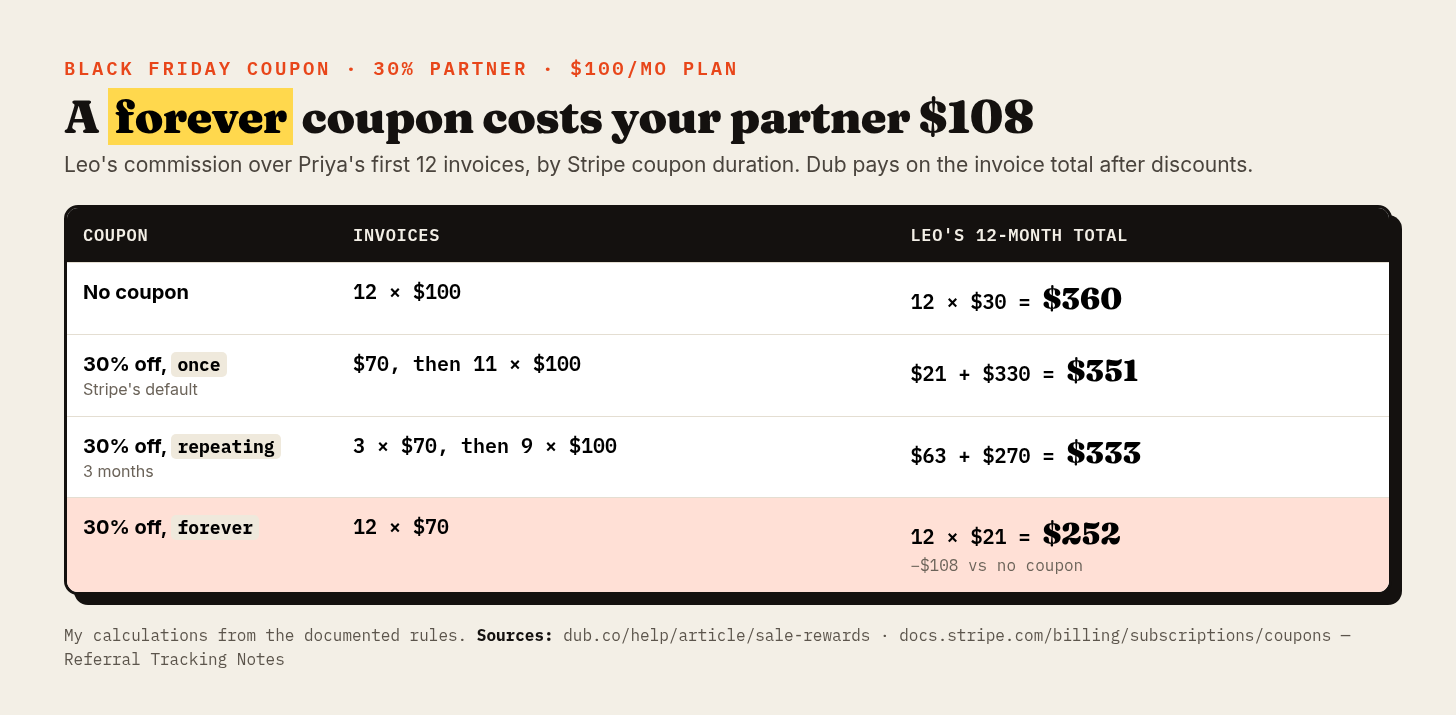
- No coupon: $360.
- 30% off,
once: $351. - 30% off,
repeatingfor 3 months: $333. - 30% off,
forever: $252.
A forever coupon is a 30% pay cut on every commission Leo earns from that customer, $108 over the 12 months. Tell partners before the promo, not after they notice. Dub's own discount examples include a "30% lifetime discount" and a "25% discount for the first 12 months" (Dub help: dual-sided incentives), so you can set it up either way.
Tax comes out first
Say Stripe Tax adds 10% and Priya pays $77. Dub's invoice formula is saleAmount = amount_paid × total_excluding_tax / total (Stripe integration: tax handling), so $77 × $70 / $77 = $70, and Leo still gets $21. In Stripe's terms, total is "Total after discounts and taxes" and total_excluding_tax includes "all discounts but excluding all tax" (Stripe docs: the Invoice object). For Checkout sessions, Dub subtracts total_details.amount_tax from amount_total instead. In a multi-product checkout, each line's commission uses its share "after discounts, tax exclusion and currency conversion" (Stripe integration).
The first-time-order trap
If you run free trials, this is the one to fix before Thanksgiving. Discount codes you create through Dub are limited to first-time orders in Stripe by default. If your signup flow creates a trial subscription or a $0 invoice, "Stripe may classify those customers as returning purchasers and reject the code." Your partner's customer types the code and gets an error. Turn off "Eligible for first-time order only" in Dub's Stripe integration settings. It only affects codes you create afterward (Stripe integration: first-time order restriction). Stripe supports this restriction on promotion codes, not on plain coupons (Stripe docs: coupons and promotion codes).
Code-only tracking is easier and blurrier
You can skip links entirely and give each partner a Stripe promo code. Dub supports that with no code changes, and warns that "you sacrifice attribution accuracy". You lose geolocation, device, referrer and UTM data, and Dub guesses location from the billing address (Stripe integration: option 3).
The bigger problem is that the code is the only thing tying the sale to the partner. If Priya types your sitewide BLACKFRIDAY code instead of Leo's, Leo gets nothing. With link tracking, his click already tied her to him, and the sitewide coupon just lowers the invoice. That's my reading of how Dub's documented flows fit together, not something the docs spell out, so test it.
And you can't edit a Stripe coupon once it exists. To change a Dub discount you delete it and make a new one, and deleting it in Dub leaves the coupon sitting in Stripe (dual-sided incentives).
A refund in month 2
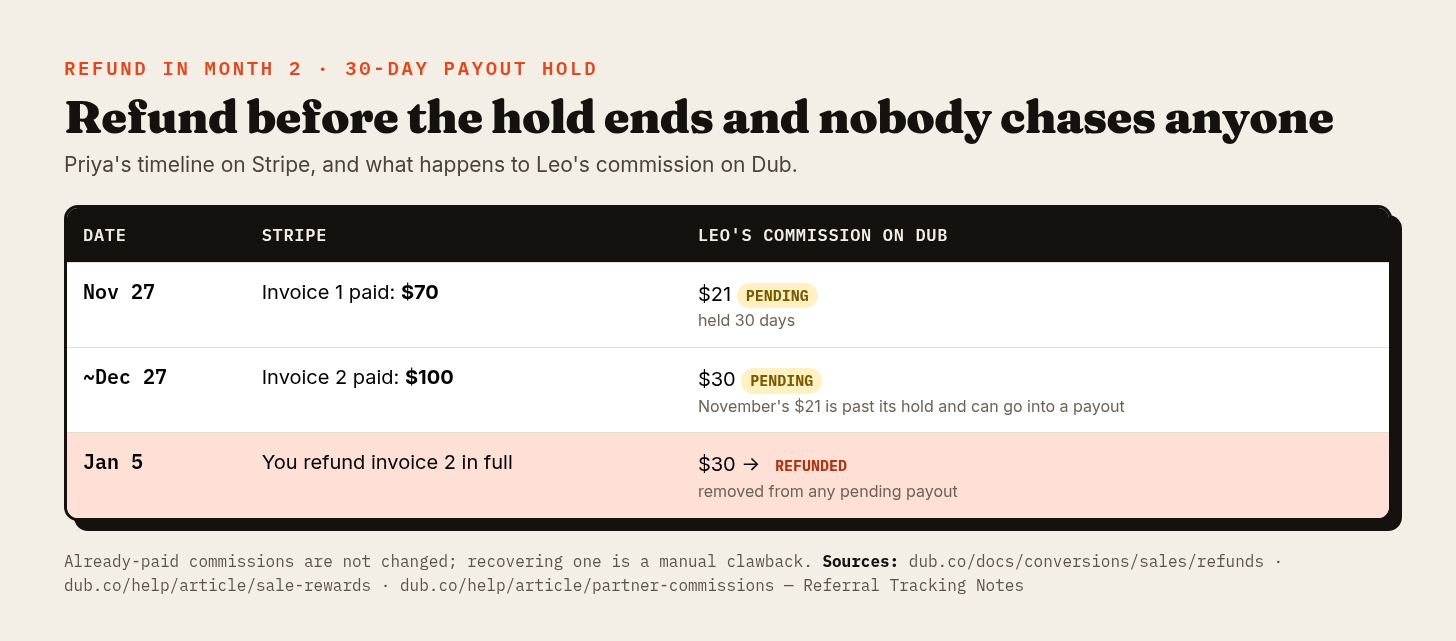
- Nov 27. Invoice 1 is paid at $70. Leo's $21 sits as Pending for the 30-day hold.
- Around Dec 27. Invoice 2 is paid at $100. Leo's $30 goes to Pending, and November's $21 can now go into a payout.
- Jan 5. You refund invoice 2 in full. The $30 becomes Refunded and drops out of any pending payout.
Dub's Stripe integration tracks refunds "automatically… without any additional setup," and the commission is "marked Refunded and removed from any pending payout" (tracking refunds; sale rewards). Leo loses $30 he never had. No awkward email required.
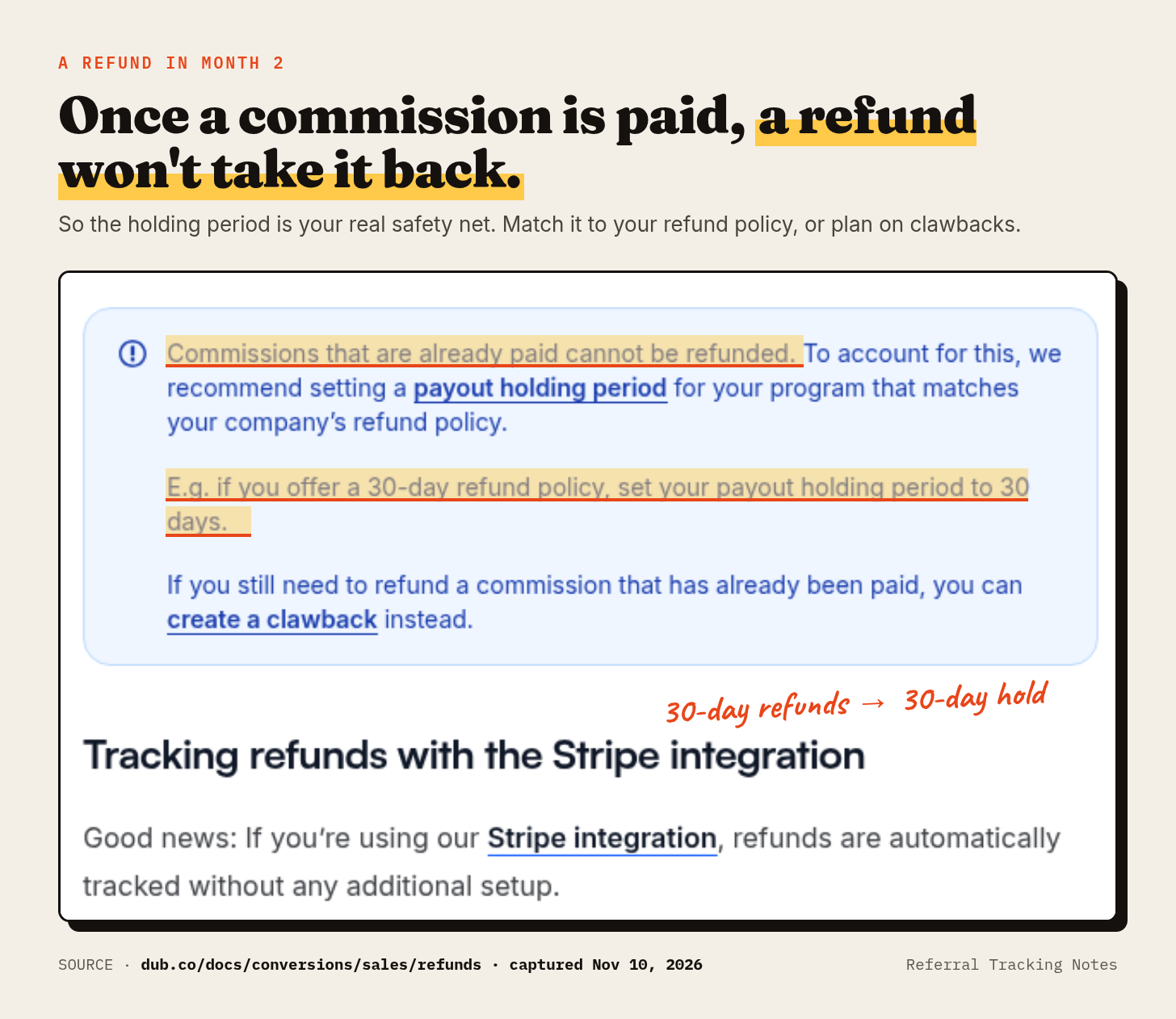
Now Priya is angry and you refund November too. If Leo's $21 has already gone out, Dub leaves it alone: "Commissions that have already been paid aren't changed" (sale rewards). You create a clawback, a negative commission "subtracted from their next payout" (Dub help: partner commissions). Fine if Leo has more sales coming. If he doesn't, you're asking a partner to give back $21.
Which is why Dub tells you to match the hold to your refund policy: "If you offer a 30-day refund policy, set your payout holding period to 30 days" (tracking refunds). It also doesn't recommend a 0-day hold, because "commissions can be paid out before refunds and chargebacks come in" (partner payouts). If your Black Friday promise is "refund any time in January," 30 days is too short, and so is 60: a Nov 27 commission clears on Jan 26. I'd use 90.
Partial refunds, where the docs go quiet
Refund $50 of the $100 December charge. Stripe allows that, and lets you refund a charge more than once up to the original amount (Stripe docs: refunds). The fair commission is now 30% of $50, or $15.
Whether Dub's Stripe integration drops the $30 to $15 by itself, the docs I read don't say. The refunds doc describes a status change to "Refunded," which sounds all or nothing. The commission API, on the other hand, is "useful for handling refunds (partial or full)." It takes a new earnings value, a new saleAmount, or modifySaleAmount, where a negative number decreases it, and "paid commissions cannot be updated" (Dub API: update a commission). Run one partial refund in staging and look. If the commission is still $30, set earnings: 15 through the API before the hold ends, or create a $15 clawback after the payout.
Disputes have their own rules. An open dispute puts the commission On Hold on Advanced and above. Lose it and the commission is Refunded. Win it and it goes back to Pending (sale rewards).
An upgrade mid-cycle, then a downgrade
Omar is another customer Leo sent, with no coupon. On day 15 of a 30-day cycle he moves from the $100 plan to the $200 plan.
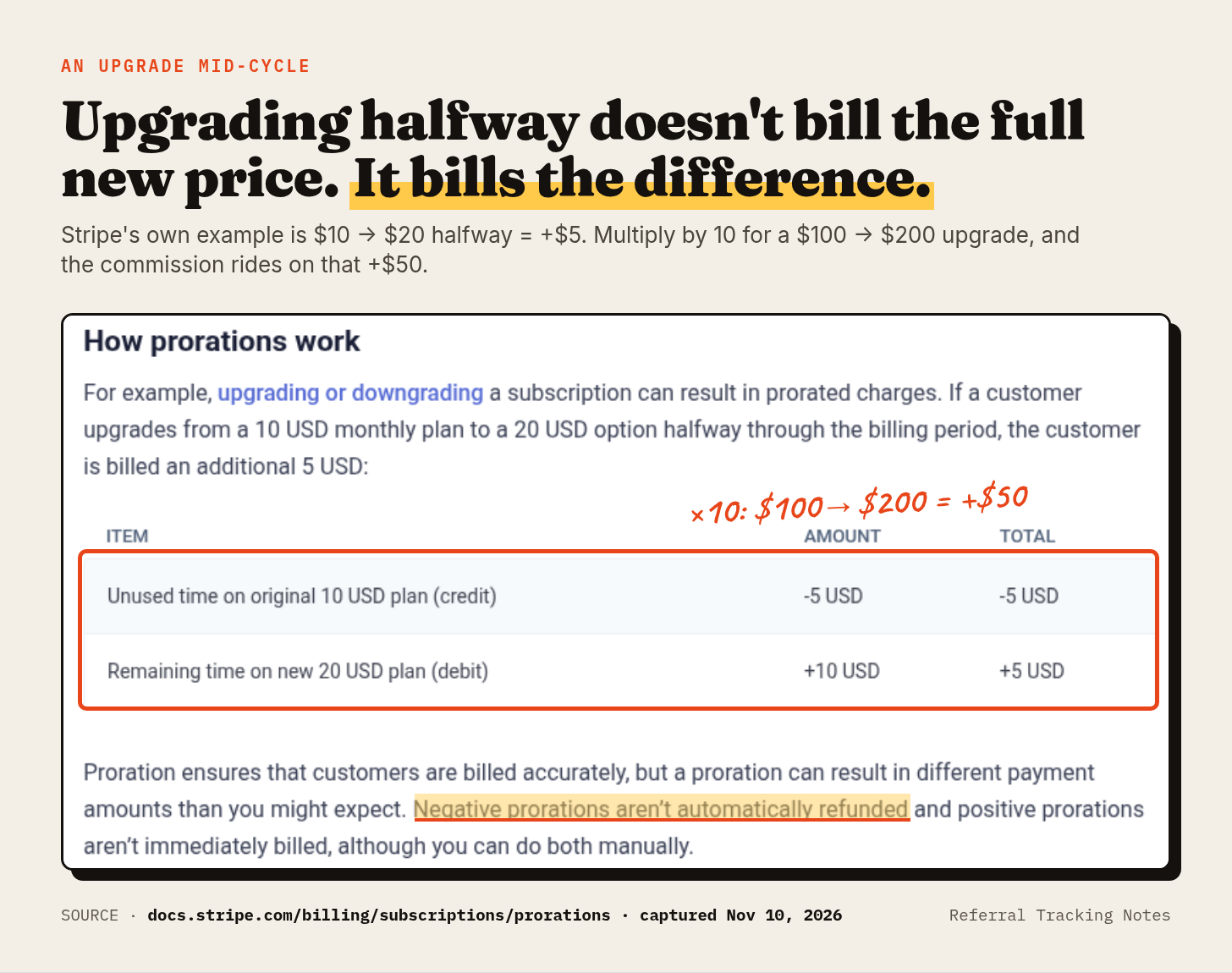
Stripe's docs walk through the same move at a tenth the size. Upgrading "from a 10 USD monthly plan to a 20 USD option halfway through the billing period" bills an extra 5 USD, a $5 credit for unused time against a $10 charge for the time left. Same page: "Negative prorations aren't automatically refunded and positive prorations aren't immediately billed" (Stripe docs: prorations).
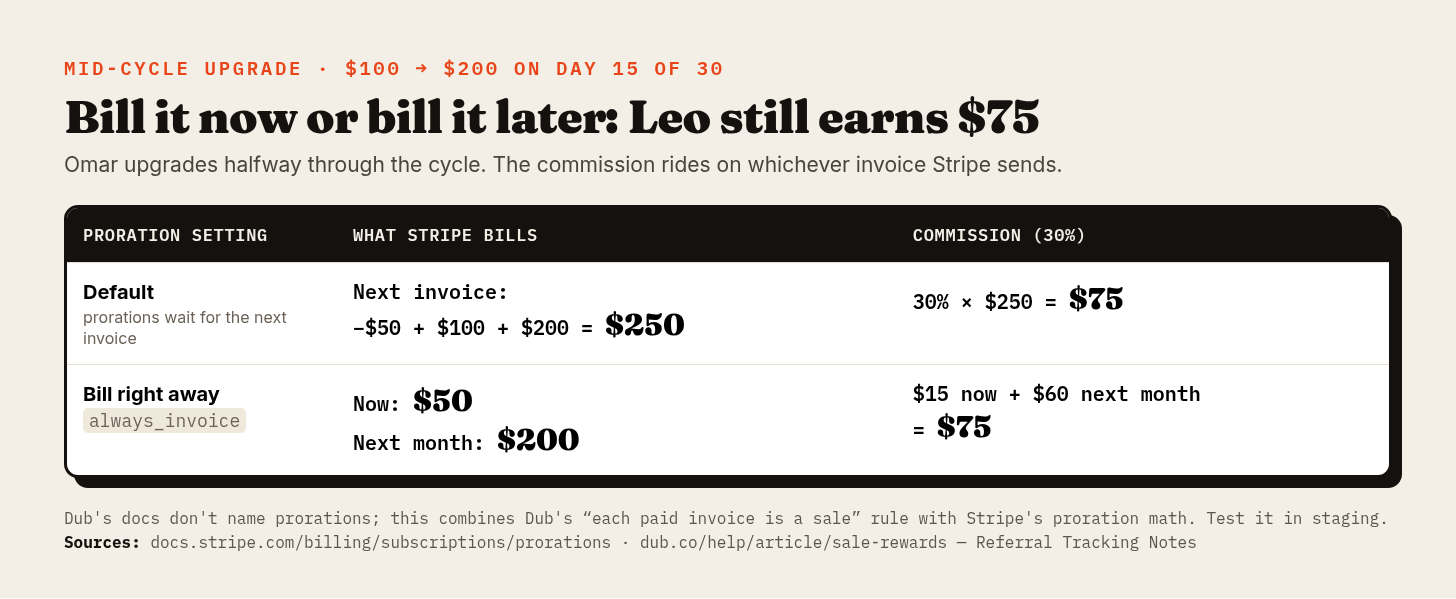
- Default prorations: the next invoice has a $50 credit, a $100 charge and the $200 month, so $250. Leo's 30% is $75.
always_invoice: Stripe bills $50 now, a $15 commission, then $200 next month, $60. Also $75.
Same money, different timing. Dub creates a sale for each paid invoice (sale rewards), so the commission lands on whichever invoice Stripe sends. Dub's docs never say "proration", though. I got here by combining Dub's one-sale-per-invoice rule with Stripe's math, so test one upgrade.
A live coupon changes the numbers. Stripe prorates "using the subscription's discounted price" and doesn't discount the proration lines twice (prorations). Give Omar an active 30% repeating coupon and the upgrade becomes a $35 credit plus a $70 charge, $35 of proration, plus $140 for the next month. That's $175 on the next invoice and $52.50 for Leo.
Later Omar drops back to $100 on day 15 of a cycle: a $100 credit against a $50 charge, $50 in his favor. Stripe doesn't refund it. Downgrade prorations become credit against the next invoice (Stripe docs: customer balance), so that invoice is $50 and Leo earns $15. Earlier commissions stay put, because no charge.refunded event ever fired. When credit only partly covers an invoice, Dub "records the paid amount without its tax share" (Stripe integration: tax handling).
The fine print
- Dashboard edits. You can edit the earnings amount only on custom commissions that haven't been paid, while status changes work on any unpaid commission (partner commissions). Partial fixes to a sale commission go through the API.
- Plan gates. Sale rewards, refund tracking and the Stripe integration need Business ($90 a month, $81 billed yearly). Dispute holds and custom reward conditions need Advanced ($300, or $270 yearly). Payouts carry a 5% fee on both, 8% if card-funded, and Business caps payouts at $2,500 a month (dub.co/pricing, monthly and yearly toggles; partner payouts).
- Duplicates, if you build it yourself. Stripe says webhook endpoints "might occasionally receive the same event more than once" (Stripe docs: webhooks). A tool deals with that. A weekend script often doesn't, and Leo gets paid twice.
If you pay out a few hundred dollars a month, that $90 floor and 5% matter more than anything above. Cheaper options are in Tolt alternatives and Dub vs Rewardful vs PartnerStack, and every tool's monthly bill at $2k, $10k and $50k in payouts is in affiliate software pricing for 2026.
A test to run before Black Friday
Dub gives Business-plan programs a staging workspace for testing "conversion events, integrations, and partner payouts without changing your live analytics or using real money" (Dub docs: testing). Run these there:
- Check out through a partner link with a 30% coupon on a $100 plan. Expect a $70 sale and a $21 commission.
- Add tax to the same checkout. The sale should stay at $70.
- Fully refund a renewal before the hold ends. The commission should show Refunded.
- Partly refund a renewal and write down what happens. The docs won't tell you.
- Upgrade mid-cycle with
always_invoice. Look for a commission on the proration invoice. - Redeem a Dub-generated partner code on an account that already has a trial. If Stripe rejects it, turn off the first-time-order setting.
- Start a trial that creates a $0 invoice, or use a 100%-off coupon, and note whether a $0 sale shows up. The docs I read don't say what Dub records.
For the wider click-to-payment check, see how to verify your SaaS referral tracking. Moving off PartnerStack before the holidays? PartnerStack alternatives covers what leaving costs.
If you'd rather let Dub keep these books, it has a 14-day trial.
Try Dub Partners: https://refer.dub.co/shamil (Affiliate link - I may earn a commission)
FAQ
Does Stripe have built-in affiliate tracking? No. Stripe records customers, invoices and refunds. A separate tool, or your own code, ties a payment to a partner and calculates the commission from Stripe's events.
Is the commission calculated before or after the coupon? On Dub, after. A $100 plan with 30% off pays a 30% partner $21 (sale rewards).
What happens to a commission when the customer gets a refund? Unpaid, Dub marks it Refunded and pulls it from the pending payout. Already paid, it stays paid, and you create a clawback against the partner's next payout. Whether a partial refund trims the commission on its own, Dub's docs don't say (partner commissions).
Why did Stripe reject my partner's promo code? Dub-created codes are first-time-order-only by default, and a trial or $0 invoice can make Stripe treat the customer as returning. Turn off "Eligible for first-time order only" in Dub's Stripe integration settings (Stripe integration).
Sources (all checked Nov 10, 2026)
- Dub help, Sale-based rewards: https://dub.co/help/article/sale-rewards
- Dub docs, Tracking refunds: https://dub.co/docs/conversions/sales/refunds
- Dub docs, Stripe integration (tax handling, first-time order restriction, option 3, multi-line items): https://dub.co/docs/integrations/stripe
- Dub API, Update a commission: https://dub.co/docs/api-reference/commissions/update
- Dub help, Partner commissions (statuses, clawbacks): https://dub.co/help/article/partner-commissions
- Dub help, Partner payouts (holding period, card 8%): https://dub.co/help/article/partner-payouts
- Dub help, Dual-sided incentives: https://dub.co/help/article/dual-sided-incentives
- Dub docs, Testing your implementation: https://dub.co/docs/testing
- Dub pricing (monthly and yearly toggles): https://dub.co/pricing
- Stripe docs, Prorations: https://docs.stripe.com/billing/subscriptions/prorations
- Stripe docs, Coupons and promotion codes: https://docs.stripe.com/billing/subscriptions/coupons
- Stripe docs, Refunds: https://docs.stripe.com/refunds
- Stripe docs, Invoice object: https://docs.stripe.com/api/invoices/object
- Stripe docs, Customer invoice balance: https://docs.stripe.com/billing/customer/balance
- Stripe docs, Webhooks: https://docs.stripe.com/webhooks
About the author
- Independent notes on SaaS affiliate and referral tracking: pricing, Stripe attribution, refunds and payouts. Sourced from each vendor's own docs.
Comments
Join the discussionNo comments yet. Be the first to comment.